Showing posts with label CEH. Show all posts

Thursday, May 17, 2012

Part II – Security Policy, SMB - Security Is At The Forefront


For a lot of SMB’s a good security policy is the basis for a strong network defense.  However for those companies who have not designed and implemented a security policy within their organizations, security issues are lying in wait.

A security policy is the backbone and foundation for information security.  However in this day and age some SMB’s have ignored or not kept up with current security concerns and their policy or lack of policy may allow for a severe security breach.  This may in fact prove fatal for a SMB.

In Part II of my series for SMB, I am going to look at what makes a good security policy.

1.  Executive Management Buy In

All security policies should begin with an executive management summary that includes the purpose, direction and approval of the policy.  This informs IT as well as employees that security is supported in all aspects of the business.  Security needs to be addressed from a top down approach when it pertains to support.  By supporting security initiatives from this approach employees know that security is not only implemented but supported at all levels.

2.  Policies

A security policy is actually a collection of different types policies put together to create one policy.  The other types of policies are created from different areas that need to be secured, such as identification, authentication, authorization and auditing.   Other types of policies would include a user access policy, password policy, vpn policy, remote access policy, wireless policy and acceptable use policy.  Each one of these policies would address a certain set of guidelines and procedures when implementing these technologies.

3)  Standards


Each policy will have standards of how the technology can be implemented.  Standards are important because they allow us to measure by a metric.  For example, if the password policy has a minimum length of 8 characters, then when we set passwords we have a value to measure if we have met the standard.

4)  Guidelines

As mentioned earlier, each policy may also have a set of guidelines.  Guidelines are helpful because they allow us to implement technology with variables that may differ from one area to another area.  Guidelines provide a range of values because if we set a standard it may not be appropriate for that technology.  An example of a guideline would be the types of hardware purchased for laptops.  No one laptop may fit all the needs so guidelines are put in place to ensure secure hardware is purchased.

5)      Procedures

These are the details that go along with every policy that explains the how, who, what and when of how the technology is implemented.  An example of a set of procedures would be how a Cisco wireless thin client would be installed and managed.

6)      Acceptable Use Policy

This is part of the security policy that informs everyone on how company assets and resources are to be used inside and outside of the company.  The acceptable use policy has guidelines, procedures and standards from how you can use a company laptop to where you can go on the internet.  It is important that companies ensure this is updated and employees are made aware of changes.

If you would like to get some more information of creating a security policy and download some templates for the creation of different types of policies try SANS: Information Security Policy Templates

Next month in part 3, I will be discussing how SMB’s can implement and improve security awareness. 

Thank you and if you have any questions during the series please feel free to email me at wpruett@centriq.com


Tom Pruett
Consultant/Instructor


Connect with Tom!
LinkedIn 
Facebook
Twitter
KC IT Security Blog
YouTube

Monday, April 2, 2012

Part I - Threats and Vulnerabilities, SMB - Security Is At The Forefront

SMB's share a lot of similarities with large enterprises when it comes to IT Security.  Those similarities include confidentiality of data, preventing unauthorized access and ensuring availability of data.  However, enterprises have the resources such as security personnel to ensure these objectives are achieved.  SMB's have the same threats and vulnerabilities except they may or may not have the the personnel or knowledge that these threats and vulnerabilities may even exist or that they may even be effected by them.  

In Part I of of my "SMB - Security Is At The Forefront" series I am going to explore the unique challenges presented by threats and vulnerabilities for SMB's. 

I. Security Policies  - The Key

Whenever I do a security audit for a SMB, the first thing I find is the lack of a specific security policy.  I either find no policy or only a statement in the employee handbook about the AUP (Acceptable User Policy).  This is not enough in this day and age to ensure a secure environment.  First, the owner or owners need to understand that security is important and that their acceptance and support of a security policy is first and foremost.  A written policy explaining the policies, baselines, standards, procedures and who is responsible for security should be created so everyone understands what is to be expected with regards to security. 


II. Patching Control 

Most SMB's do not have a managed patching system.  By this I mean a centralized method of controlling when and what patches are applied to OS's and applications.  Most SMB's rely on Windows Update to individually update the OS, however it is up to the individual to ensure the updates are applied.  This can mean a workstation might not be updated and have a serious vulnerability.  A major component to a secure system is ensuring that all systems are up to date with the latest patches.  This includes a process that ensures that patches and updates are tested and rolled in a timely fashion.  This can be done easily and effectively by WSUS (Windows Server Update Service).  Also, ensuring a set of procedures to audit to ensure all systems are up to date is very important.

Weak Passwords

This is one of the biggest vulnerabilities for a SMB.  A lot of SMB's have weak password policies or none at all.  Employees are allowed to create passwords on their own for their workstations without any guidelines nor are they made to change them.  Also, in some cases there is no password on the system at all.   A strong password policy is crucial to securing a system.  All employees should be required to have passwords that are at least 8 characters, have a number and a character and should be changed at least every 45 days. 

Default Accounts

The use of default accounts is also sometimes an issue.  By this I mean workstations have just a default account on them such as administrator or guest with no password.  This allows anyone to use the system with minimal or no controls creating a vulnerability whereas a hacker or employee could exploit the machine.

Physical Controls

Since most SMB's only have a few offices, there may not be a great need for locks and door security since this is usually done.  However security to the IT closet or where the servers are located needs to be addressed.  Normally having only a few devices does not negate the fact that all servers, routers, switches and firewalls need to be in a secure place and have limited access. 

Wireless - Rouge Access Points, Weak Wireless Security

Sometimes SMB's will employ wireless solutions just as they would as if they were installing one at home.  This can be a serious concern because business wireless should not be treated like home wireless.  Business wireless should be concerned with getting connectivity with secure protocols and most importantly controlling access to the wired network.  Basic installation and lack of controls on the use of the wireless usually lead to a security breach.

Lack of Security Awareness

Owner and employees need to be aware of secure practices when doing their job.  All employees should understand the impact on the company if they are working on a computer regardless if it is connected to a network.  Having a good understanding of secure practices will help protect the company from most security breaches.

Next month in part 2, I will be discussing most specifics on how to create a SMB security policy.

Thank you and if you have any questions during the series please feel free to email me at wpruett@centriq.com 


Tom Pruett

Network Security Engineer/Senior Technical Instructor

Wednesday, February 22, 2012

Small/Medium Businesses: Security is at the forefront

As a IT consultant to several SMB's (Small Medium Business), I talk to owners everyday about their needs and concerns about their IT infrastructure. Most of the time the conversation is about increasing productivity through the use of technology.  Right now the hot topic there is cloud technology.  They feel they need to be  more efficient with processes and avoid creating redundancy.  The one thing that is not a big topic is security.

No offense to SMB's but I am not sure that these owners are fully aware of what is really going on with cyber-security.  A lot of small and medium shops treat their IT security as if they have nothing to worry about.  Now I am not here to say that all of them are not security aware, however they read something in the news about a security breach at a large company but think that will never happen to them.  Hackers do not discriminate.  If you have data and a internet presence you are a target.

The key to SMB security is to synergize business objectives and productivity with security.  Just because you lock down your IT infrastructure does not mean you cannot do business.  You just have to find a way that works best for your company.  Its easy to be productive if you have no controls on the infrastructure, however its the lack of those controls that could produce a security breach or incident that will cause you not to be productive.   I believe there is a way for all of these areas to coexist.

SMB security has some challenges that are different from enterprise security.  Sometimes SMB IT personnel are great administrators but may be unaware of security threats that may exist.  They are in charge of a lot of areas for the business and there is no security department like in enterprise companies to help them. Therefore while they are solving business needs and doing day to day brake it and fix there is just not the time to maintain up to date security.

So what is a SMB to do?  Where do they start?  Over the next month and a half I am going to be exploring 6 key areas for SMB security. 

Key Areas of SMB Security


1) SMB Threats and Vulnerabilities

2) Security Policy

3) Security Awareness

4) Internet Access

5) BOD (bring your own device) Security

6) Auditing Administrative, Technical, and Physical controls


Hopefully if you are a SMB this series may get you to re-evaluate your security needs and have a better understanding of your security needs.

Thank you and if you have any questions during the series please feel free to email me at wpruett@centriq.com

- Tom Pruett, Cisco & Security Expert; MCT, CTT+, CISSP, CWNA, CEH, CHFI, CCSI, CCNA, MCSE LinkIn with Tom

Bookmark and Share

Tuesday, February 14, 2012

The Need For Forensics - Finding The Why and The How In Security


Computer forensics has been around as long as computer crimes.  People have stolen money, information and disabled businesses all while thinking they are the smarter criminal since they are using an electronic device.  So what happens when law enforcement is notified of a cyber crime or IT security is notified of a security breach?  Every crime or security breach is investigated and goes through a computer forensic process.  Law enforcement and IT security are trained as computer forensic specialists to try and find out not only the why a crime or breach was committed but also how it was done.

Forensics is the first part of a good incident response plan.  It is the first action item that is performed during the IRP when a crime or breach is detected.  It is also the most crucial.  In the last 10 years computer forensics has come along way.  New tools and techniques have been developed to help not only law enforcement but also security professionals in the private sector.  Computer forensics is more than just using your troubleshooting skills or break it and fix skills. Its about using that knowledge in a methodical way to prepare a hypothesis about an event.  Maybe its finding out how someone got a password for accessing files that they were not authorized to see or even how they developed a script to change a time sheet remotely.  Regardless of the event, there is always a need for a computer forensic professional.


There are two main areas of forensics we deal with in IT security.  One is the network and the other is the host. Each area has different methodologies and tools we use to dissect the why and the how.  Also each area has its different areas of expertise and knowledge.  To understand how a security event happened in forensics you have to first understand how the network or host is suppose to work.  This is where training and experience play a crucial role in becoming a computer forensic investigator.


For over 7 years I have taught Eccouncil's Certified Hacking Forensic Investigator (ChFI) course.  In March of 2012 Eccouncil will be bringing out a
new version 8 of ChFI. This course will be bringing a fresh perspective for those interested in getting into computer forensics.  The course will have plenty of hands on learning as well as an introduction into a wealth of forensic tools.  The major premise behind using the tools in the labs is to get a base understanding of the forensic process which includes:
  1. Search and seizure
  2. Secure a crime scene
  3. Documenting the chain of custody
  4. Acquiring electronic evidence and secure transportation of evidence
  5. Examine and analyze forensic images using sound methodology 
  6. Design your review strategy of the e-evidence and interpret and draw inferences based on facts gathered from the e-evidence.
  7. Prepare a report on your analysis and findings
  8. Expert witness
So if you would like to know more about computer forensics and use those break and fix skills to find out the how and what, make sure you sign up at Centriq Training for ChFI.

Hope to see you there.

- Tom Pruett, Cisco & Security Expert; MCT, CTT+, CISSP, CWNA, CEH, CHFI, CCSI, CCNA, MCSE LinkIn with Tom

Bookmark and Share

Monday, January 16, 2012

New Year, New Changes in Security Training!

As the new year comes upon us, vendors are rolling out some new or updated courses for the beginning of 2012, but what type of training is right for you or what new courses are worth the time and money?  The answer depends on what area of security you want to pursue.  I always recommend having a very sound understanding of the basics in networking and operating systems if you are getting into security for 2012. As for those of you who already work in security, there are some new and updated courses coming out for 2012 that are very exciting.


One of the things you need to look at is does the course help me understand the security concepts and does the course provide a hands on example for reference.  Some courses discuss a concept but then nothing to really help solidify the concept such as an example.  Also, if you are looking for the latest and greatest in concepts and examples, most vendor classes are about  6 months to a year behind.  It is up to the instructor to provide up to date examples for current concepts.  The instructors background and experience play a major role in filling in the gaps.


So what are the up to date and new courses for 2012? 


Updated Courses


Network+ - 
CompTIA has update the Network+ for 2012 with a more of an emphasis on technologies and how they relate to the OSI model.  I like the fact that they have made more of an emphasis on the areas of SANS and WANS.  However I would say that the course still covers 85% of the previous objectives.  It is not really a huge upgrade, more of an incremental update.


CEH version 7.1


Eccouncil has brought out new revision from their version 7.0 of this class.  This is a major update with even more update labs and content than the previous version 7. 


New Courses


CSAP


This is a new course from CompTIA intended to focus on the 10 year security veteran.  It focuses a lot on Enterprise LAN and WAN security.  As of this writing not to much is known about the CSAP and it may be a while before we know anything more definitive.


Good luck in 2012 and hope you have a great year.

- Tom Pruett, Cisco & Security Expert; MCT, CTT+, CISSP, CWNA, CEH, CHFI, CCSI, CCNA, MCSE LinkIn with Tom

Bookmark and Share

Tuesday, January 3, 2012

Where is Security Headed in 2012?


2011 was a very difficult year for IT Security.  It seems as though everyone is now taking security very seriously and are now trying to make up for it.  Hackers have definitely gained the advantage and those in security are slowing losing ground.  The reasons for this are many, some are business, some are technology and some are the fact that a lot of companies are just now looking at security.  There is plenty of blame to go around; however hackers may be winning the battle now but are far from winning the war.   None of this was more real to me than after attending Hacker Halted 2011.  

After being exposed to so many new attack methodologies and threats in this cyber war, I came to the opinion that it is still in the reality that we can combat these new threats.   The realization from those on the front line, the trenches of IT security, is still upbeat and hopeful.  Most believe it will take a concerted effort by everyone to gain the upper hand because this is not a war that is won or lost but fought to gain or maintain the upper hand.
 
So what are the challenges for 2012?  This time of year everyone has put out a list of what to look for in the coming year.  I thought I might give a few thoughts on what I think are the main challenges going forward are for 2012.  You’ll see some are challenges we have had for a few years and some are new.
 
1.    Mobile technology threats
Smart phones are around 30% of the phone market.  Users use their phones from getting the latest sports news to paying bills.  The ability now for users to have portable technology almost like a computer, more than doubles the vulnerabilities on a network.  The number will increase over the year because smart phones are just about all that being introduced to the market.  The tablet market is growing by leaps and bounds.  Phones and tablets portability and complexity provide new challenges for securing data.  This is the new frontier of hacking victims.   
 
2.    Small businesses (SMBs) will enter the crosshairs of cyber attacks
SMB’s are the new large victims of hackers.   These types of businesses are the last ones to really start understanding security and its impact.  No more can they just focus on revenue.  What happens when you have no way in making revenue because of a security breach?  SMB’s are the most susceptible to a cyber-attack because of the lack of attention to security.  Although SMB’s are behind, they will be catching up in the coming year.
 
3.    Social media will increase in popularity as a conduit for social engineering attacks
Social media will continue to increase in popularity as the most effective way for social engineering attacks. Social media is fast being adopted by small and large businesses.  Companies can expect to see more social media profiles used as a way for social engineering tactics.  Hackers will use clever tactics to trick end-users into disclosing sensitive and private information and to downloading malware.  Facebook with its 850 million users are prime targets for data breaches.
 
4.    Companies will continue to overlook key vulnerabilities, hoping and waiting for governmental compliance to drive security. 
Governmental regulations remain the yardstick by which most company’s judge and conduct security.  Using a checklist that is developed for security initiatives is dangerous because a number of security regulations overlook basic IT security controls. Sure these regulations address the need for encryption or the development of an incident response plan but few require a wide range of best-practice controls such as up-to-date anti-virus software. More breaches occur as a result of security gaps.
 
5.    Cloud computing services, a storm is coming.
Cloud services continue to gain in popularity, so too will related security breaches will also flourish. Companies are smartly embracing the cloud for the associated cost savings and ease of use. These types of services have been around for years, it has only been in the last couple of years due to increased and stable bandwidth that companies are looking at cloud services.  Unfortunately, current reports indicate that companies are underestimating the importance of security due diligence when it comes to using these cloud providers.   

This is only a few of the security challenges we face in the future.  2012 will see more vulnerabilities, threats and exploits than in any time in the history of security.

- Tom Pruett, Cisco & Security Expert; MCT, CTT+, CISSP, CWNA, CEH, CHFI, CCSI, CCNA, MCSE LinkIn with Tom

Bookmark and Share

Friday, July 1, 2011

Security+ SYO-301 - New Exam Goes Live. Not Your Same Old Security+ Exam


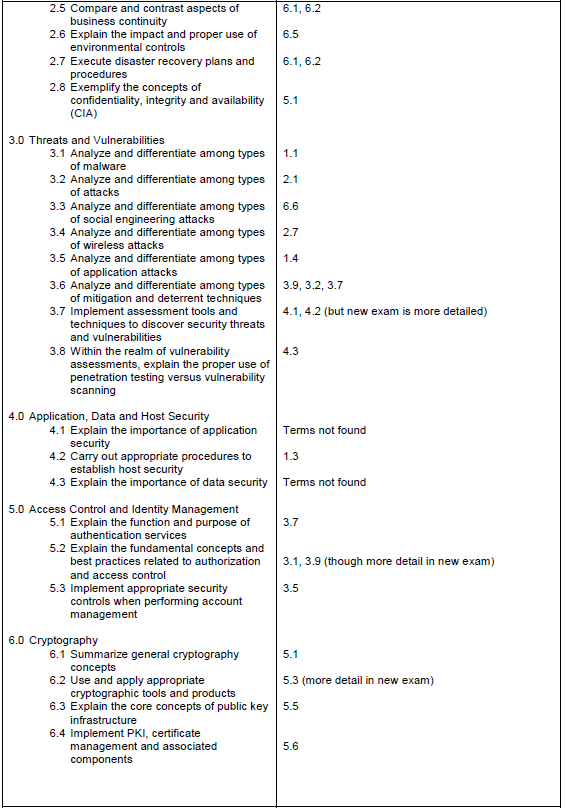
As promised by CompTIA in 2010, the new Security+ exam (SYO-301) is now live.  It has been 3 years since the Security+ exam has been updated and CompTIA is keeping with a policy of renewing exams every 3 years.  The new exam has a look and feel of more real world objectives along with some content from the ISC2 CISSP exam.  Listed below is the differences between the 201 objectives and the new 301 objectives.


You can still take the 201 exam through the end of 2010.  If you are thinking of taking the new exam, almost 90% of the information from the 201exam is still applicable.

As of July 1, the Security+ class that I teach at Centriq Training will be using new curriculum to reflect the 2011 objectives.

If you have any questions please feel free to contact me.

- Tom Pruett, Cisco & Security Expert; MCT, CTT+, CISSP, CWNA, CEH, CHFI, CCSI, CCNA, MCSE LinkIn with Tom

Bookmark and Share

Have we seen the last of LulzSec?


I don't think so.  LulzSec last week supposedly threw up the white flag last week and decided to disband.  Was this because the Anonymous group was going to go after them or because law enforcement was hot on their trail?  I have a different theory.

I believe we will still see attacks by this group except it will be under a new name or a splinter faction.  LulzSec drew a lot of attention over the last couple of months by their attacks on
PBS and the Arizona DPS, and it was this attention that may have drew the ire of some hacker groups (Anonymous Group) for bringing too much attention or stealing the limelight.  It has been rumored that there may have also been a splintering of LulzSec by those who did not want to draw this attention.  Either way, I still believe we have not heard the last of LulzSec.


- Tom Pruett, Cisco & Security Expert; MCT, CTT+, CISSP, CWNA, CEH, CHFI, CCSI, CCNA, MCSE LinkIn with Tom

Bookmark and Share

Monday, June 6, 2011

IT security is not just for big business...

Yesterday in the Financial Times was a report on the current issues surrounding Cyber Security.  The report had many articles on current attacks to large enterprises and what we can can expect in 2011 (download the report here).  One of the articles titled "Market chaos leaves small businesses as primary target",  mentions an all too familiar issue with small to medium size businesses, the “accidental IT guy – or gal."

Small and medium size businesses sometimes have a person in charge of any IT issues that are put in that position because there is not a qualified person on staff or the duties just sorta of fall in their lap.  Whatever the reason, the network then becomes vulnerable to cyber thiefs because they know the network may not be secure and an easy mark for an attack.

Due to the current fiscal crisis that a lot of small and businesses are growing through, IT security is usually put on the back burner.  This usually leads to a vulnerable network, that a hacker may be able to attack and steal either data or financial information.  Think about it, why would hackers try and go after a large enterprise with its security when it could go after a small or medium size business's unprotected network?  If your business is collecting and type of data or financial information, your company is vulnerable.  This is a growing problem and one that needs to be addressed if you want to protect your business.

What is the answer to this growing problem?  Small and medium size business's need to have a trained IT security person on their staff or hire a  security consultant to do a security audit for the whole company and a penetration test to ensure all vulnerabilities are addressed and countermeasures are in place.

In this day and age the worst thing a business can do is ignore a cyber threat because they think "It won't happen to our company."   You never know it may have happened already and you just don't know it.
If you have any questions on small or medium size business IT security, please feel free to contact me.


- Tom Pruett, Cisco & Security Expert; MCT, CTT+, CISSP, CWNA, CEH, CHFI, CCSI, CCNA, MCSE LinkIn with Tom

Bookmark and Share


Latest Security Events - Two Different Issues, Same Result

In the past week 2 companies have been hit with security breaches regarding unauthorized access. Although both incidents are different in the mode of attack the outcome is still the same, unauthorized access causing downtime and loss of integrity in a system which in the long run will have more of a financial impact.

First Lockheed Martin is hit with authorized access surrounding the use of remote server access by employees using RSA token system. Right now Lockheed Martin is reporting that a remote server was hacked into and that the hacker gained access to a system by possibly using an RSA token. This is significant because RSA in March reported a security breach and that possibly tokens were stolen. Could a hacker have used a stolen token to access Lockheed Martin or could a Lockheed Martin employee token been stolen and used to gain access? The answer is not clear and we may never know. However swift action by Lockheed Martin's cyber-security unit prevented any more unauthorized access or breach of data.

Second, PBS reported thier website was defaced by hackers because of the airing of the "Wiki Leaks story" last week. The hacking group claimed they were upset over the show and decided to show PBS the power of a hacking group. The website was restored and new security measures were added to prevent this type of attack in the future.

So what do these two different security breaches have in common? Both show what happens when "a threat + a vulnerablity = a breach." It can be assumed that Lockheed Martin, the largest supplier of military airplanes, has very good security. PBS, well since they are a non-profit company, they might not have the tightest security. Both Lockheed and PBS remind us that no matter what your company, vulnerabilities have to be addressed or eventually your company will either have a major disruption or downtime.

- Tom Pruett, Cisco & Security Expert; MCT, CTT+, CISSP, CWNA, CEH, CHFI, CCSI, CCNA, MCSE LinkIn with Tom

Bookmark and Share

Wednesday, March 2, 2011

News: CEH v7 Release

Centriq Training, in conjunction with EC-Council, is pleased to announce the release of Certified Ethical Hacker (CEH) v7.
The line of EC-Council CEH products immerses students in an interactive environment where they learn to scan, test, hack and secure their own systems.

According to EC-Council, “The new version is a breakaway from earlier releases with more emphasis on techniques and methodologies, which attackers may use to carry out possible attacks against networks.”

For more information on CEH v7, visit https://eccouncil.org/cehv7.aspx. For questions, upcoming dates or course information, visit http://www.centriq.com/Pdfs/Courses/Security/CEH-100v7.pdf or contact your account executive at 913-322-7000.

- Jessica Oliver, Director of Operations LinkIn with Jessica

Bookmark and Share

Tuesday, March 1, 2011

Public WiFi - You are not alone...

One of the concepts I teach in both my consulting business and the classroom is when you are using free public WiFi access you have to take precautions because you are not alone. Public WiFi access is free but the security is not. Here is a scenario.


You are at your favorite coffee shop that offers free WiFi. You connect your laptop and surf out to Facebook or you go check your email. Now unbeknown to everyone in the coffee shop is a hacker that is "sniffing" the wireless network. Since you have no security protocols and access does not require any type of password or key, all of the wireless traffic can be recorded on a packet sniffer such as Wireshark, Cain & Abel, or NetResident. A packet sniffer is software that captures packets on a wired or wireless network. The packets captured show the network or internet traffic that a person is creating by surfing on the internet or while using the network. These packets will contain usernames and passwords that you type into a web browser as well as the location of all the sites you are browsing too. If you put any PII (Personal Identifiable Information) on the internet, the hacker can capture this information and sell it on the internet which would create "Identity Theft" for the user.


 The hacker may even attempt to gain access to your laptop right there in the coffee shop as well. Also remember the hacker does not have to be in the coffee shop, they can be several hundred yards away using a special high gain antennae to access the wireless network.


So is there such a thing as using a free wireless network safely? Yes, you can. You just have to follow a few simple rules to protect yourself.

 1) If your on a company laptop, make sure you are using a VPN (Virtual Private Network) connection. This will encrypt your connection and you can safely access the internet through your company. Don't have a company vpn? Try AnchorFree, it is a free vpn client that anyone can install and use to surf the internet through a secure vpn server.


2) If you need to just check your email or access a web site make sure you are using https or ssl to ensure you are checking your email with a encrypted and safe connection.


3) If you are going to surf the internet in public try using a wireless phone modem device which you can purchase from your wireless carrier. It is a USB device you plug in to access a secure wireless network for your computer.

Good luck and remember "we are not alone on the internet".

- Tom Pruett, Cisco & Security Expert; MCT, CTT+, CISSP, CWNA, CEH, CHFI, CCSI, CCNA, MCSE LinkIn with Tom

Bookmark and Share

Monday, February 21, 2011

Ease of Use vs. Secure

Everyday there is news of a security breach.  A hacker has attacked a website with a DDoS or malicious code has infected an employee's computer and has spread it to the rest of the office.  These types of security breaches may not have happened to you, but they do happen and eventually they will happen to your network.  The question is: Are security events such as these or others completely preventable?  The answer is no, however what we can do is help mitigate these types of events by applying a simple security axiom I have taught for many years in my security classes.  "Ease of Use vs. Secure"

IT security departments constantly are torn between business directives and security directives.  On one hand administrators need to balance the needs of users with the needs of security.  The two work in a vacuum most of the time in IT.  If something is done in IT that is considered "Ease of Use" meaning its easy for the administrator to create or implement then it probably is not very "Secure".  On the other hand if something is "Secure" it is likely to be more intensive to create or implement and not very easy for users to use.


As you can see in diagram above, with "Ease of Use" on one end and "Secure" on the other, business needs for users tend to be less restrictive  while IT needs tend to be more secure.  If IT implements things that satisfy user needs and not security needs, eventually there will be a breach.   However there can be a happy medium between the two so that security breaches are less likely to happen.

Lets take a look at an IT practice to see how this really works.

Last month Vodafone learned a hard lesson about users sharing passwords that access a customer database. Vodafone's Breach

Vodafone's practice of allowing shared passwords with the company (Ease of Use) was easier for users and administrators, however it was not a secure practice.   Although Vodafone rectified the issue, it should have never been allowed to happen in the first place.  Does your company practice "Ease of Use or Secure"?


- Tom Pruett, Cisco & Security Expert; MCT, CTT+, CISSP, CWNA, CEH, CHFI, CCSI, CCNA, MCSE LinkIn with Tom

Bookmark and Share

Monday, January 10, 2011

What exactly is a Zero Day attack?

This is a question I get all the time from clients and students.  I tell them a "zero day attack" is when a vulnerability is discovered in an application or an OS and is unknown to the vendor or general public and a patch has yet to be released to fix it.  The term zero day indicates basically that the attack could happen anytime because the system does not have a patch to fix the vulnerability.

Zero day attacks are the worst situation for security folks because we just do not know when said attack will happen.  We are left in kinda of a limbo wondering if and when the attack might happen to our systems.

Here is a current example:

1)  Microsoft has a known vulnerability in IE 8 for certain OS's.  The vulnerability may allow an attacker to create a cross site scripting (XSS) attack to gain access to a system.  Microsoft has not issued a patch but is investigating the issue.  link

2) Vuepen Security has confirmed that this is a vulnerability.  link

3) Metasploit also has included this vulnerablity and the actual code to exploit it in there latest release of Metasploit as well.  link
(By the way if you are not familiar with Metasploit check out my video.  link)

The only good news is that we can use Metasploit to test if our systems are vulernable to the attack, the bad news is hackers can also use Metasploit to attack a system.  This is what makes a zero day attack so dangerous.

Only time will tell on a zero day attack.

- Tom Pruett, Cisco & Security Expert; MCT, CTT+, CISSP, CWNA, CEH, CHFI, CCSI, CCNA, MCSE LinkIn with Tom

Bookmark and Share

Friday, July 30, 2010

CISSP Exam – August 7th - Kansas City – 5 Tips For Success


The ISC2 CISSP exam is schedule for August 7th in Kansas City. Usually the Kansas City area schedules this exam twice a year. Well it's that time, most people have been studying for a few months for this exam date and are now coming down to crunch time. Here are my 5 tips for success for the exam.

  1. In the last few weeks of studying you should be going over the questions on the CCCure Quizzer. You can either do the free questions or pay $39.99 for the 6 month subscription. The pay option is well worth it.

  2. Create a testing plan that will allow you time to take little breaks in between questions. You have 6 hours for the exam with no scheduled breaks and all breaks count against your test time. Using all of you allotted time is beneficial. Allowing yourself a 5 or 10 minute break after so many questions allows you to keep on schedule and not get behind or go to fast. Also remember to bring little snacks and something to drink which you can put in the back of the room during your breaks.

  3. Do not cram the night before. In fact put all of your studying aside and have a quiet evening doing something you enjoy. Go to bed early and get a good night's rest.

  4. The morning of the exam, don't drink a lot of caffeine and eat a little something for breakfast for energy. You do not want to waste too much time going to the restroom several times during the exam.

  5. Remember to bring your certification ticket and two forms of ID. You will not be allowed in with any of these items.

Good luck on the exam!


- Tom Pruett, Cisco & Security Expert; MCT, CTT+, CISSP, CWNA, CEH, CHFI, CCSI, CCNA, MCSE LinkIn with Tom


Bookmark and Share