Tuesday, November 8, 2011

MS Outlook 2010: Improve your efficiency using Quick Steps!


There is a wonderful tool in Outlook 2010 called Quick Steps that will help you to manage your email messages. These are one-click buttons that you customize to perform multiple actions. For example, perhaps you often create messages to your team. You can set up a Quick Step that will create a new message already addressed to the appropriate recipients.

To get started, click any of the default Quick Steps found on the Home tab of the ribbon, or check out all the options available with “Create New”. A dialog box will open with options for what actions will occur when the button is selected. You can even specify a keyboard shortcut and set a tool tip reminder that will appear when you point at the button!


Check out http://www.howtogeek.com/howto/27827/create-and-customize-quick-steps-in-outlook-2010/ for more detailed, easy-to-follow instructions on how to use this new tool.

- Irene Heckert, Microsoft Office Expert; CTT, MCAS, ITIL Certified, MOS LinkIn with Irene

Bookmark and Share

Thursday, November 3, 2011

The Web’s 4 Hats & an HTML5 Overview - Part II


Designer

The designer in me wants to have my great user interface so well integrated into the data and processes that you don't notice. And I want it to be beautiful. That hat wasn't the one the standards committees were wearing when they proposed the gradients and transforms. Misguided blink spans and easy marquees have been put to death as many times as Freddie and Jason but keep coming back for more. Now we have them again, only this time a little more well dressed. I really don't even like the drop shadows but some of these will look much better to the high-res tablet crowd.


I am happy with SVG support and the graphics we can do, but where is my visual SVG graphics designer integrated with HTML and CSS? Android was the last to jump on the SVG graphics bus and most of the rest of the cheesy effects have partial support so I know I will be trying out Inkscape and SVG Edit when I need.  Or I'll just sit back and let the widgets take over for me like the SVG based Chart control in Visual Studio and jQuery plugins.

I find the most pleasure with web fonts, especially Google's public accessible fonts and having Web Squirrel give me everything I need to do it on my server. I can talk to the device to get info I need to deliver a pleasing layout with the @media queries. And when I need that old-timey newspaper look, there's multi-columns, but I fear it's a retro feature that will be better left alone due to the complexity it creates for the layout.

Surprisingly, I think the designer ended up with some of the best improvements. Colors are better defined both with more names and flexible opacity. The video and audio elements will have to wait for the patents to become less profitable while we find a common standard to work with. The dominance of the iPad will force me to encode a different way but I don't like it.

Businessman

If you want to know who is going to win the HTML5 battle, you just have to follow the money. And the hat in charge of the money is the businessman. This hat is the hardest to wear since it requires you to not think technically and focus on the customer. Does the customer really want what we think is geeky cool warez? Probably not.

I liked the idea of doing a survey of the currently used names for divs and classes in the wild in order to understand how people used HTML. But what were we supposed to do with that? Did I really want a better element because I was really happy with just calling my div a wrapper in the id and not a section. You want me to recode it? When?

What helps me make money? Coding faster. Reusing other people's code. If all you do is rename things, then it's going to get in my way. Now if you make it easier to find elements in CSS by adding better selectors, I'm not going to complain but it is looking more and more like a grep or regex language these days.

I can reuse other people's code if they've marked up what I want to use and now we're back to microformats because what I want is not generic text groupings that are or aren't related. What I want are finer granulation on the most common business entities which is exactly what the microformats do.

Other types of useful abstraction that will be faster or give me critical information are the new communcations APIs like Web Workers or Web Sockets and the ability to let me work offline with session or local storage when paired with the page caching. Geolocation is just a one-trick pony but had to happen when you start moving yourself around instead of sitting at the same IP day after day. And the database storage on the client will improve the user experience for offline as well.

Conclusion

People want a desktop application experience on the web and want it whenever they want it there. People have to have it easy and that means the developers as well as the users. So will I use the semantic markup? Probably. It will help me as a programmer. Will I use the <canvas> and other graphic elements? Probably not. I like SVG and JavaScript generated graphics as long as I don't have to write it. I can use Adobe Edge or other visual programs for that. Will I use the features that aren't well supported like drag & drop and datepickers where I can use jQuery and jQuery mobile to get standardization now? Obviously not.

The 2-D and 3-D graphics are incredible and not in my realm as a web developer but if you are a game developer that wants to leverage the e-commerce platforms of the future like the Apple App Store, Android Marketplace or possibly the Amazon juggernaut commerce system, then you must develop using <canvas> because it's the fastest and standardized.


As to why standards groups like the W3C and WHATWG don't move too fast, it's because you have four different groups of people all lobbying for their view. The DBA had the upper hand in the last version and now the designer and the engineer seem to be dominating. But like a real business, it's the dialog that is important to crafting a best solution for the whole. Let one company or one hat take over and it would be an impending fail.

The businessman is going to take you to that application experience that you so want. And he will charge you for it and pay you to develop great apps for it. The standards committees don't think like businessmen so you'll need to see what people are really using, really need, and get paid for. My best bet is to watch Google for how they use search data and to watch Amazon for how they will use their e-commerce platform. Of course, you'll also be watching Apple and Facebook as app delivery leaders. Then code for it and enjoy.

- Doug Hoff, Business IT Expert; MCT, SCJP, ITILv3, COBIT LinkIn with Doug


Bookmark and Share

Thursday, October 27, 2011

The Web’s 4 Hats & an HTML5 Overview - Part I


I recently returned from speaking at a conference in Kentucky where I ended up putting on four hats and seeing HTML5 and the future of mobile computing differently each time. I was struggling with trying to figure out why standards committees take so long to come to an agreement. After all, the vision of the web is clear, right?

Why did we get off the XHTML superhighway and jump on the scenic route where we ignore the bumps and potholes of bad syntax and limited metadata? What kind of folks are driving the bus right now and are they really going the right direction? Should we stay on the bus while we head into Mobileville? I've decided that the questions you pose are at least if not more important than the answers you think are right. Because that tells you what your vision is and if you've followed a little of this blog, you know that strategic vision is important.

The four hats are:
  • The Engineer - who likes all of the functionality logically thought out
  • The DBA - who likes the the data well defined and stored
  • The Designer - who likes to deliver an emotional message to the customer
  • The Businessman - who makes sure the customer is happy and they make a profit
Those four hats have led me to not watch the standards groups as much as watch Google and Amazon for what to use in the future that people want. The real vision of the web is to make money by giving computer users what they want. Waiting for standards groups won't get you there. After all, the current prediction is that CSS3 will be completely standardized by 2022.  Here's a rundown of the first two hats:


Engineer
As a software engineer and instructor of many students who become programmers, I know that the web has become populated with these folks that want to turn it into an application environment. That way they can program for it and make it do their will. The back end servers are full of Java, C#, and php and that same force is heading to the browser with JavaScript.

I see the HTML world being altered so that these variable manipulators can have better code and read each other's functions easier. The push in HTML5 towards meaningful naming of the loosely typed datatypes that were divs and spans is going to give programmers a better handle on what it is they are talking to. The code will become less dependent on ids and more dependent on setting up the HTML with the proper element names like <mark>, <time>, <progress>, <meter>, <details> and some of the more argued over names like <style scoped>.


I can see where the types of activities previously handled by JavaScript are being pushed into HTML. This reduces the language down to one, slightly more complex, language. Do we want a merger here of interests? Is the MVC principle being corrupted and should we really mix our text markup with programatic data validation in the same code module? The data and its validation are View Model pieces that are tightly coupled and should be handled together in my mind.

So the future lies with the ultimate merger of HTML and JavaScript and we'll have a Razor style view engine in all browsers eventually. My opinion is not to follow the same syntax and find a better way to merge the two. But the merger will eventually come. Simplified syntax for CSS3 and JavaScript have started to reinvent these stuffy languages and if jQuery can simplify CSS with a replacement like EZ-CSS, sass, or less, then we're on our way. I'm hoping it's not like node.js and stylus, but I need to try those more.


DBA
I also love to understand data and its meaningful use. Having the right field name and the right multiplicity gives me a warm glow. But I also know that too much data analysis can torture those poor programming souls who have to recombine the data for the page they work on.


Here we're not talking about the fields where programmers hand over their data after the output is available but where the data can be semantically meaningful as text. These are the domain entities and at a high level they are represented by <header>, <nav>, <footer>, <section>, <aside> and <article>.

My biggest hurdle here is knowing that the data already comes from a semantically proper framework called the database. If all the work has been done there, then who benefits by rethinking the meaningful structure one more time for the web? The only answer is that the DBA traditionally send the data to the programmers who use that "data markup" for their benefit. The field names become bundled together and as I put back on my Engineer hat, I am happy to create complex View Model types for my View, the web page.


But it's reinventing the wheel when there's a database and it's better for team coding experiences to have more readable code. But wait, is there a web service that might be looking for my article elements? Not yet in the HTML5 way. If you are looking for a current semantic framework of entities, you have to look no further than Google's recommendations. The microformats they recommend carry much more weight for reasons to mark up with them than just a standards board. People are using the schemas for reviews, events, organizations, places, restaurants, recipes, etc. without even knowing about it but you are losing out on having Google process your data and provide search results with it if you don't.


The XHTML push that we unceremoniously dumped was a DBA's dream for a perfect interface language between data source and data consumer. The problem was that it's not a homogenous set of data. Our web DBA's don't work under the same domain and the complexity made it uncomfortable to work with so many needs and choices that we found had already been solved with another data model. Or two (relational and objects). We didn't need a third (XML).

To be continued...

- Doug Hoff, Business IT Expert;
MCT, SCJP, ITILv3, COBIT LinkIn with Doug


Bookmark and Share

Tuesday, October 4, 2011

How To: Use Windows Event Collector

Many of my students have been unsure how to use a new feature of Windows 2008 and Windows 7 called the Event collector.  This feature allows one or more computers to forward a copy of events from selected logs, to a different computer that is called an event collector.  For example, assume that I have four servers.  I want to have three of the servers send any critical and error events from their Applications and System logs to one server so that I can review them.  

My assumptions for this article are that all four computers are domain joined.  Only domain joined computers can use this feature.  My other assumptions are that my computers will communicate using HTTP port 5985 and none of my servers are domain controllers.   Below I will outline the steps based upon my assumptions.
1. Decide which computer will be the collector of events and which computer(s) will be forwarding events to the collector.  


      2. Logon to each computer that will forward events as an Administrator and open a command prompt as an Administrator. 
a.  Type winrm quickconfig and press Enter.  WinRM will then ask you about adding a WinRM firewall exception as show below.  This screen shot is from a Windows Server 2008 R2 computer.  (You may be prompted to set the WinRM service to a delayed auto start and setting the WinRM firewall exception.  This is the behavior of Windows 7.)  Accept the change(s).


b. Continue performing this step on all computers that will be sending events.

3. Now you are ready to logon to the collector.  This is the computer that will be collecting the events.
a. Again, type winrm quickconfig and press Enter. 
b. Then type wecutil qc and press Enter.  This will allow users on a different computer to subscribe to (send) events on this computer.
c. When prompted to change the wecutil startup mode, click y and press Enter.
d. Type Exit and press Enter to exit the command prompt.
  

4. Click Start| Administrative Tools |Computer Management. 

5. Expand the Event Viewer and select the Subscriptions node.
        a. Right-click on Subscriptions and select Create Subscription.
        b. In the Subscription Properties page, in the Subscription name field, type a 

            subscription name i.e. Server1 logs.
        c. In the Subscription Type and source computers section, verify that Collector 

            initiated is selected and click Select Computers.
            i. Click Add Domain Computer and type the name of the server and click Check Names.
            ii. Click OK.
            iii. Click Test.
            iv. Read the message. Click OK.
        d. Click Select Events.
            i. In the Logged field, use the drop-down list and select Last 24 hours.
            ii. In the Event level field, select Critical, Error and Warning.
            iii. Select By Log.  Using the drop-down list expand Windows Logs and 

                select Application and System logs.
            iv. Click OK.


        e. Click Advanced.
            i. Verify that the Machine Account is selected.
            ii. Examine the port.  (Remember the firewall will need to allow traffic from this port.)
            iii. Click OK.
        f. Click OK to close the Subscription Properties screen.


6. Your next task is to add the collector computer’s account to each of the local Administrator’s groups.  (If you are using a domain controller, you will need to set up a user account that has permissions to read the event logs.)


7. Once that task is finished, expand the Event Viewer\Windows Logs\Forwarded Events.


8. This is the location that your logs from the other servers will send a copy of their Critical and Errors that are displayed in their System and Application logs.


- Janet Nichols, Windows Server Expert; MCT, MCSE, MCITP: Enterprise Admin, Server Admin; Windows 7 EDA, MCTS LinkIn with Janet

Bookmark and Share

Friday, September 30, 2011

Managed Code Inside of SQL Server


What roles do you perform as the DBA for your organization?  Many times we find ourselves doing data related tasks that are thrust upon us because of software acquisitions, executive level business requirements, or a myriad of other reason.  Whichever the case, we end up working on some common repetitive tasks and some very specific unique ones.  One of those specific tasks that you may find yourself needing to implement is using managed code in your SQL environment. 
 
This article is not for everyone, that is to say managed code integration is not a common task like backup or index management, rather it is for administrators who find themselves in one of the following two situations; a) you have applications in your environment that were developed and supported in house, and/or b) you work closely with those who develop code to enhance or modify 3rd party applications.
 
In a typical n-tier application, we have front end code, business logic, and the data repository.  In fact we could have a data repository that supports many different front/middle tiers.  In such a case, we could develop stored procedures, triggers, or functions, on the data layer for shared use at the application layer.  We have heard the benefits of centralized administration of networks from Microsoft for years, we can think of the aforementioned approach as centralized development.
 
One problem that could arise from this approach is that an application may (and likely will) already have code written in it for its own use.  Therefore developing it again at the data layer, is time consuming, costly, and may have scaled down functionality due to the limitations of T-SQL.  SQL Server 2008 has the ability to create, what I will term as function “proxies” that are created inside of the SQL Server environment, but are defined in managed code.  Now, if your development team has developed some function that their application needs and placed it into a DLL, you as a SQL professional can centralize that function by simply calling a SQL Server function that calls out to that DLL for its implementation. 
 
Whether the reason for using this feature, is applying centralized coding, or combating the limitation of the data developer not knowing the same business logic specifics that the application developer knows, or that managed code is more capable of handling the business logic tasks than T-SQL, or leveraging the skills of each area of your business to minimize the development cycle – accessing managed code is a great option to explore.
 
Assume your business line is the building of bridges and you frequently need to calculate the density of steel at various elevations.  You may have this function defined in one of your applications on the middle tier, and you may find that you now need to access that function from different applications and possibly inside SQL Server.  Without managed code integration, you would have to recreate the body of the function inside of SQL server or inside of the other application.  You now have the ability to create the function inside of the SQL environment, point the body of the SQL Server function to the DLL function, and simply consume the SQL function, as you normally would.  Of course, there is a little bit of “wire-up” code that you need to provide, as well as some re-architecting from the application standpoint.  You may find the benefit of the code existing in one place makes implementing managed code worth it.  However, a cost analysis to determine if this change would be of benefit would have to be conducted.  However, designing code in the first place to be able to benefit from this capability is a great way to move forward without the cost of retooling any current code.
 
The specifics of how you chose to implement this feature are as varied as the infrastructure of your company, but the benefits of now being able to reuse .NET developed code inside of SQL server is a great way to reduce total cost of ownership in a measurable way.

- Ed Dressler, SQL Server Expert; CTT+, MCDBA, and MCITP LinkIn with Ed

Bookmark and Share

Thursday, September 29, 2011

How To: Set Up Windows Sever 2008 & R2 Accidental Delete Protection

Windows Server 2008 and Windows Server 2008 R2 have the ability to protect objects from accidentally being deleted. This feature is extremely helpful in environments where there are numerous Administrators making many changes. This feature may also be useful in a smaller environment with less experienced Administrators.

To use this feature, simply launch Active Directory Users and Computers by typing dsa.msc and press Enter, in the Search Programs and files box, as demonstrated below:


To create a new Organizational Unit and protect it from being deleted, simply right-click on the location for the new OU and name it and remember to select the Protect container from accidental deletion as displayed below:

If you have users or groups that you would like to protect against accidental deletion, you can add this protection.   First you will need to turn on the Advanced Features of Active Directory Users and Computers.  To accomplish this select the View menu and then select Advanced Features as illustrated below: 
 
Then open the properties of the user or group that you would like to protect.   Click on the Object tab and select the Protect object from accidental deletion box.  The sample below is of a user object.

Essentially, this feature denies the Everyone group the Delete all child objects permission in the DACL (Discretionary Access Control List).  This disallows Everyone, including members of the Administrators group, from deleting any object that is set to be protected from accidental deletion.  The permission can be reversed by a user that possesses the Full Control permission to the object.  The user would simply remove the check in the box to the left of Protect object from accidental deletion or would  remove the Access Control Entry from the DACL.    An example of the Access Control Entry is below:
It is a great feature that the system has that will prevent some human errors from occurring.  Even though it is possible to delegate the permissions to control who can delete objects, it is still possible for accidental deletions to occur.  This feature forces an administrator to re-evaluate whether an object should be deleted.  If it should be deleted then the administrator can set the permissions appropriately and delete the object. 


- Janet Nichols, Windows Server Expert; MCT, MCSE, MCITP: Enterprise Admin, Server Admin; Windows 7 EDA, MCTS LinkIn with Janet

Bookmark and Share

Tuesday, September 6, 2011

MS Word Tip: Easily align text using tabs


From here........................................ to here 


Above is an example of a right tab with a dot leader set at the 6” mark.

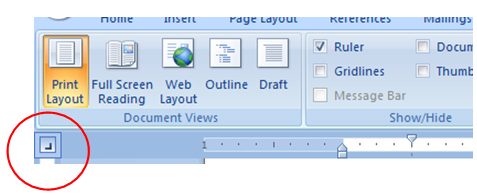
1. If necessary, show the ruler below by clicking the check box on the View tab of the ribbon in the Show/Hide group. Also verify that your document is in Print Layout view.

2. It is helpful to turn on the Show/Hide button in the Paragraph group on the ribbon. This will allow you to see the non-printing arrows that appear when you touch the tab key on your keyboard.

3. Use the button on the left end of the ruler below the ribbon to select the basic tab type (left, center, right, decimal, etc.).  Click the button several times to cycle through the different tab types. This shows a right tab type selected.
4. With your mouse, left click on the ruler where you want the tab to be. This shows a right tab set on the ruler at the 6” mark.


5. To see all tab options (position,  type, dot leaders, etc.) you must open the Tab options dialog box. The easiest way to do this is to point your mouse at the tab you have set on the ruler. When the tool tip appears, double click the selected tab.

The Tabs dialog box will appear displaying all tab options.


This shows a tab set at the ½” mark and at the 6” mark. The 6” tab is selected and is a right tab with a stye 2 dot Leader.

You can make changes to tabs you have already set, set additional tabs, or clear extra tabs here.  Select the tab from the list and change the Alignment, set the Leader, change the position, or clear the tab.

Click the OK button when you are done!

_________________________________________________________
Alternate instructions: The tabs dialog box can also be accessed by clicking the dialog box launcher at the bottom right corner of the Paragraph group on the ribbon. When the Paragraph  dialog box appears, click the Tabs button on the bottom left corner.

- Irene Heckert, Microsoft Office Expert; CTT, MCAS, ITIL Certified, MOS LinkIn with Irene

Bookmark and Share